

PickUppointment – The Ultimate WordPress Local Pickup Scheduling & Management Suite
PickUppointment is a free pickup scheduling plugin for WordPress. Customers book a pickup date, time slot, and location online, while you manage orders, drivers, and customer emails from your dashboard. Whether you run a bakery, retail shop, laundry service, or fulfillment center, it replaces spreadsheets and back-and-forth messages with one automated workflow.
How It Works
-
Customer Schedules Pickup:
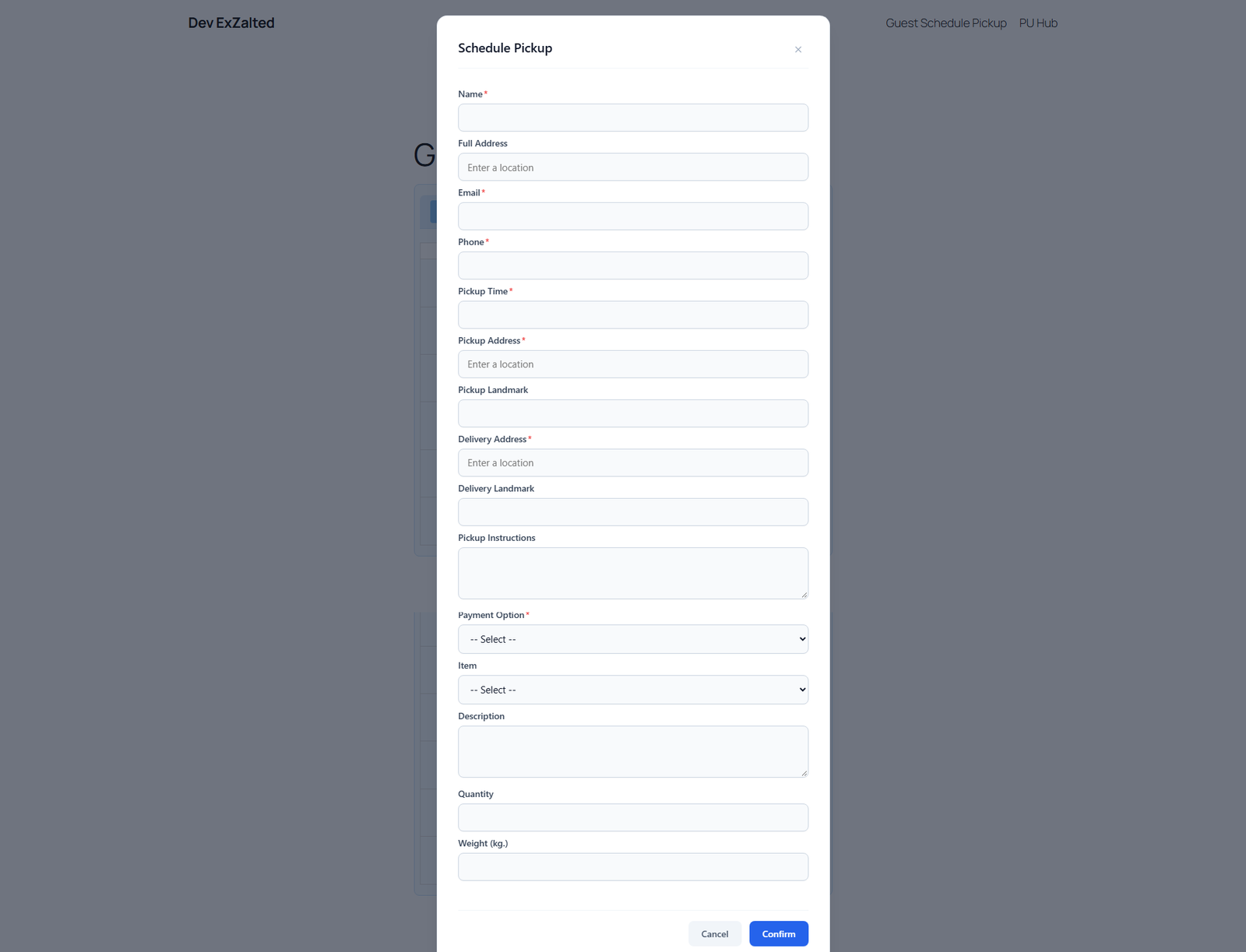
Customers easily choose their preferred date, time slot, and location using the intuitive online booking form powered by Google Maps autocomplete.
-
Admin Manages Order & Assigns Driver:
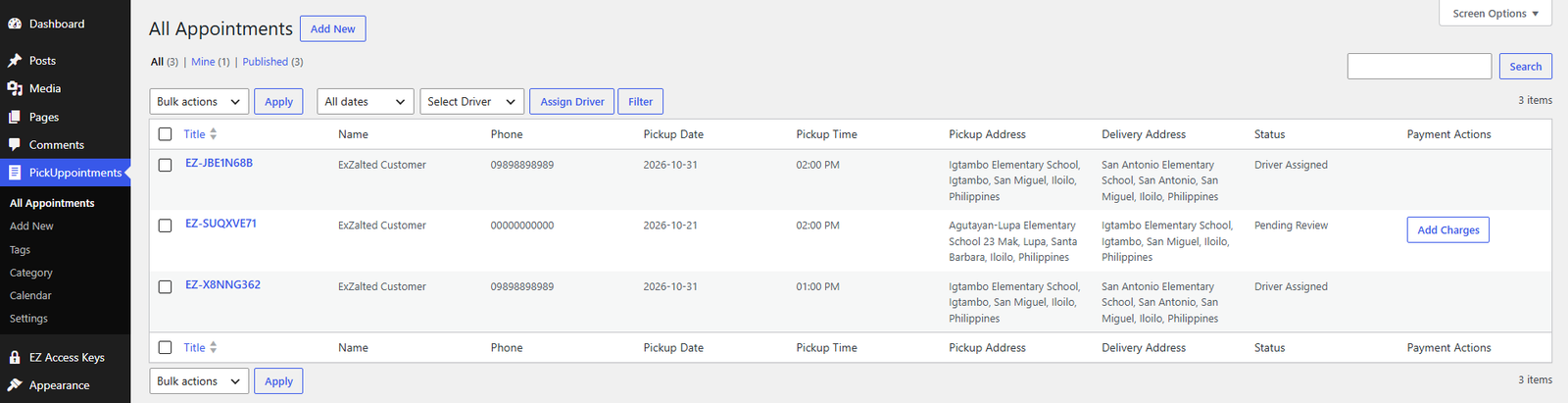
The site admin receives an instant email notification, reviews the booking details, adds or updates any necessary charges/fees, and assigns the order to a driver.
-
Driver Pickups & Delivers:
The designated driver picks up the item from the specified customer address and delivers it directly to your warehouse, store, or designated delivery destination.
-
Customer Receives Order Status Email:
Once the order is completed and delivered, an automated status update email is instantly sent to keep the customer informed.
Key Features at a Glance
-
1. Holiday & Day-Off Management
Take control of your business calendar. Easily configure custom day-offs, weekends, and public holidays so customers can only book slots when your team is open for business.
-
2. Flexible Time Slots & Capacity Control
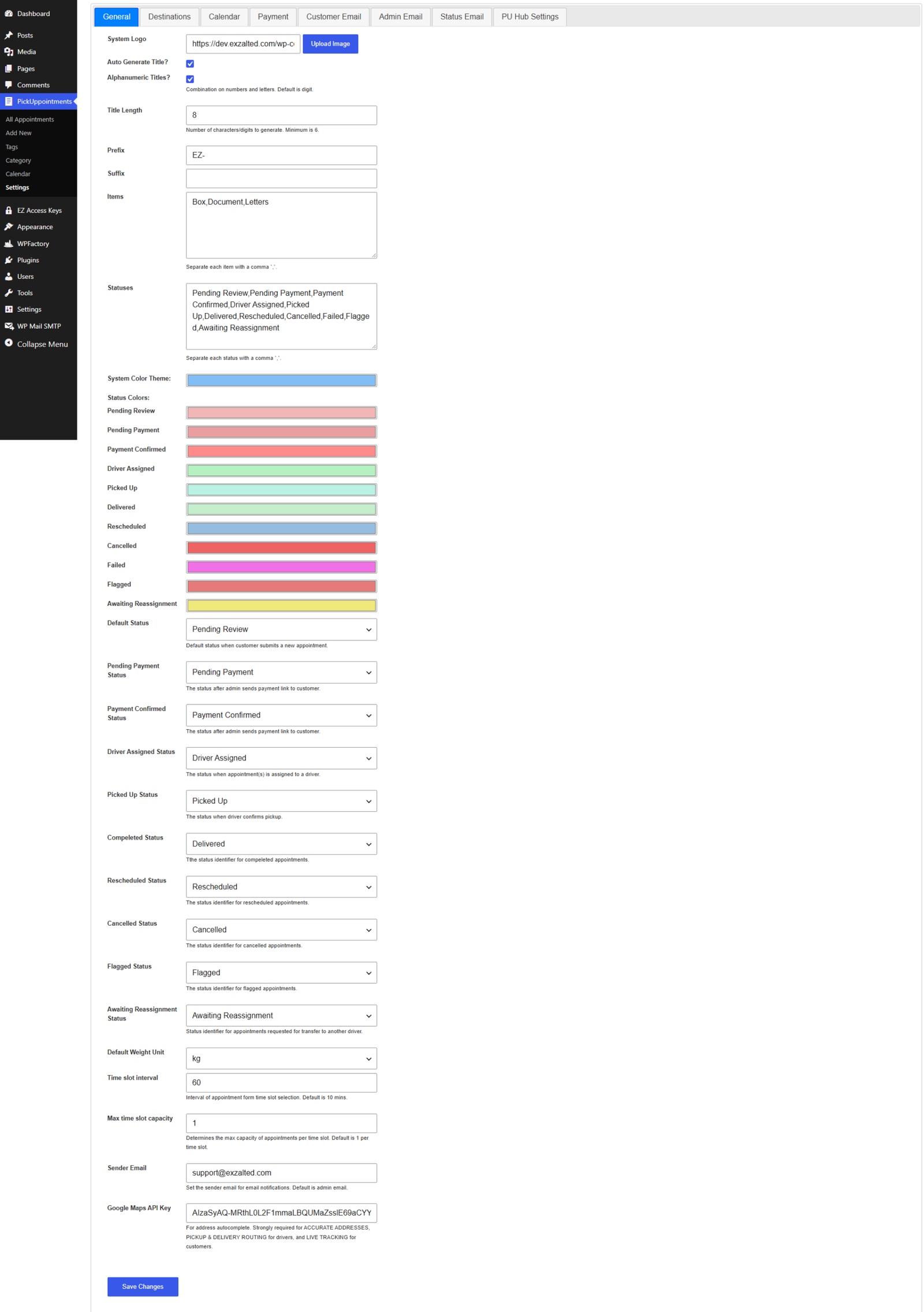
Define your operational hours with custom time slot intervals (e.g., 30-minute or 1-hour windows). Set strict capacity limits per time slot to prevent overbooking and manage your daily workload efficiently.
-
3. Built-in Payment Links & QR Code Upload
Simplify customer checkouts. Add custom payment links and upload your payment QR codes directly to instructions, giving customers seamless ways to settle their balances.
-
4. Driver Assignment
Easily assign pickup orders to your delivery drivers from the backend to keep your local delivery workflow organized.
-
5. Dynamic Charge Management
Easily add, adjust, or update extra charges, delivery fees, or service surcharges for pickup orders on the fly directly from your admin panel.
-
6. Automated Email Payment Requests
Keep cash flow moving without the manual follow-up. Automatically send professional payment request emails to customers with direct settlement details.
-
7. Easy Shortcode Integration
[pickuppointment_form_public]Embed your fully functional public pickup scheduling form anywhere on your WordPress site—whether it’s a dedicated booking page, your checkout flow, or a landing page—using a simple shortcode.
-
8. Instant Admin Email Notifications
Never miss a new booking. Receive immediate, detailed email alerts whenever a customer schedules a new pickup, keeping your operations proactive.
-
9. Automated Customer Update Emails
Keep your clients informed every step of the way with automated status update emails sent directly to customers whenever their pickup order changes.
-
10. Google Maps Address Autocomplete
Powered by the Google Maps API, the location input offers intelligent address autocomplete to ensure accurate address data, reduce typos, and streamline the scheduling process.
Screenshots
Why Choose PickUppointment?
Built specifically for WordPress, PickUppointment bridges the gap between online booking and local order management. Stop wrestling with messy spreadsheets and disconnected calendars—automate your pickup workflow today!
Need more than the free version? Explore the Premium Add-ons for customer and driver dashboards, proof-of-pickup photos, and live order tracking, or see the branded Mobile App for iOS and Android.
Frequently Asked Questions
Is PickUppointment free?
The core plugin is free. Premium add-ons and branded mobile apps are available separately if you need more features.
How do customers book a pickup?
They choose a date, time slot, and address on the booking form. Addresses use Google Maps autocomplete to reduce typos.
How do I add the booking form to my site?
Paste the shortcode [pickuppointment_form_public] into any page, such as a booking page, checkout flow, or landing page.
Can I block holidays and days off?
Yes. You can set custom day-offs, weekends, and public holidays so customers can only book when you’re open.
Can I prevent overbooking?
Yes. Set time slot intervals (for example 30 minutes or 1 hour) and a capacity limit per slot.
Can I assign drivers and add delivery fees?
Yes. From the admin panel you can assign drivers and add or update charges, fees, or surcharges on each order.
Do customers get email updates?
Yes. Customers receive status emails when their order changes, and you get an email for each new booking.