
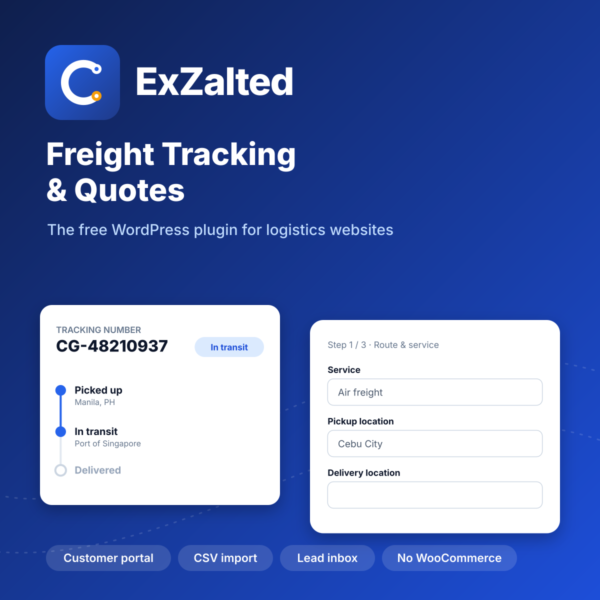
ExZalted Freight Tracking is a free shipment tracking plugin for WordPress, built for logistics websites.
It helps freight forwarders, couriers, 3PLs and trucking companies answer the two questions customers ask most: “Where is my shipment?” and “How much will it cost?” It runs on any WordPress site and does not need WooCommerce.
Why use a shipment tracking plugin for your logistics site?
Most logistics websites handle tracking and quotes by email and phone. Customers wait, your team repeats the same answers, and leads get lost in inboxes. ExZalted Freight Tracking moves both onto your website. Customers check their own shipment status at any hour, and quote requests arrive in an organized inbox instead of scattered messages.
Shipment tracking
Create shipments in the dashboard with a tracking number (or let the plugin generate one), a status, service, origin, destination, ETA and customer details. Every status change is added to a timeline that customers see on your tracking page.
- Define your own status workflow: Pending, Picked up, In transit, At customs, Out for delivery, Delivered, Exception, or anything else you use
- A clean public tracking form with a clear status timeline
- Optional email check, so the customer must enter the email stored on the shipment as well as the tracking number
- Private internal notes that are never shown to customers
- A searchable, sortable and filterable shipments list
- CSV import with a Download Template button, plus CSV export at any time
From quote request to tracked shipment
The plugin connects the whole journey, so nothing is retyped and no lead is lost.
- The customer fills in the multi-step quote form.
- You enter the price and set the quote to Quoted. The customer is emailed the final price automatically, with a secure link.
- The customer accepts or declines online. No account or login is needed.
- Accepting turns the quote into Won and creates the shipment automatically. The customer receives the tracking number by email.
- Declining marks the quote Lost and records the reason, so you learn why you lost it.
Prefer to get paid first? Turn on Wait for payment. The shipment is created as “Awaiting payment”, the customer sees your payment instructions, and you click Confirm payment received to start the shipment and send the tracking number.
Freight quote requests
- Accessible multi-step form that also works without JavaScript
- Fields that show or hide depending on the cargo type
- Optional instant estimate, followed by a request for a final quote
- Lead inbox with New, Quoted, Won and Lost statuses, quoted amounts and internal notes
- Quotes can expire after a number of days you choose
- Quote export to CSV, with a column for every field on your form
Customer portal
- Customers sign in with a normal WordPress account and see only their own shipments and quote requests
- Quotes waiting for an answer show a “Review and respond” link
- Mobile-friendly, and customers return to the portal after login
The accept and decline link in the price email opens your Customer portal page, so create that page and select it in the settings if you send quote prices.
Your brand and your emails
Pick one theme color and the plugin restyles the quote form, the tracking form and the portal. Text on buttons switches between light and dark automatically so it stays readable. Send emails from your own company address, with customer replies going to your team. Edit the email templates with placeholders such as the tracking number, status and tracking link.
Built for trust and privacy
- No external services and no tracking. The plugin sets no cookies of its own
- Emails go out through your own site’s mail setup, and only to the people involved in a quote or shipment
- Spam protection with a honeypot and rate limiting
- Works with the WordPress personal data export and erase tools
- Translation-ready, with right-to-left friendly styles
- Option to remove all data when you delete the plugin
How to add it to your site
Add each part to a page with a block or a shortcode:
[consignly_tracking]for the shipment tracking form[consignly_quote_form]for the freight quote form[consignly_portal]for the customer portal
Who is ExZalted Freight Tracking for?
Freight forwarders, courier and last-mile delivery companies, 3PL and warehouse operators, trucking and moving companies, and customs brokers.
Need more?
ExZalted Freight Tracking Pro adds a quote form builder, pricing formulas, payment proof approval, bulk updates, automation and webhooks. (Link this to the Pro product page.)
Frequently asked questions
Is this shipment tracking plugin really free? Yes. It is free and open source under the GPLv2 license.
Do I need WooCommerce? No. ExZalted Freight Tracking is standalone.
Can customers track a shipment without an account? Yes. The tracking form is public. The portal is only needed for customer accounts and for the quote accept and decline link.
Can I send emails from my own domain? Yes. Set a sender name and email in the settings.
Can I import my existing shipments? Yes. Download the CSV template, fill it in and upload it.
How does a quote become a shipment? Set the quote to Quoted and the customer is emailed the price with a link. When they accept, the shipment is created automatically.
Does the customer need an account to accept a quote? No. The link in the email works on its own.
Can I wait for payment before the shipment starts? Yes. Turn on Wait for payment in the settings, then confirm the payment from the shipment screen.
Download ExZalted Freight Tracking free from WordPress.org and start tracking shipments today.